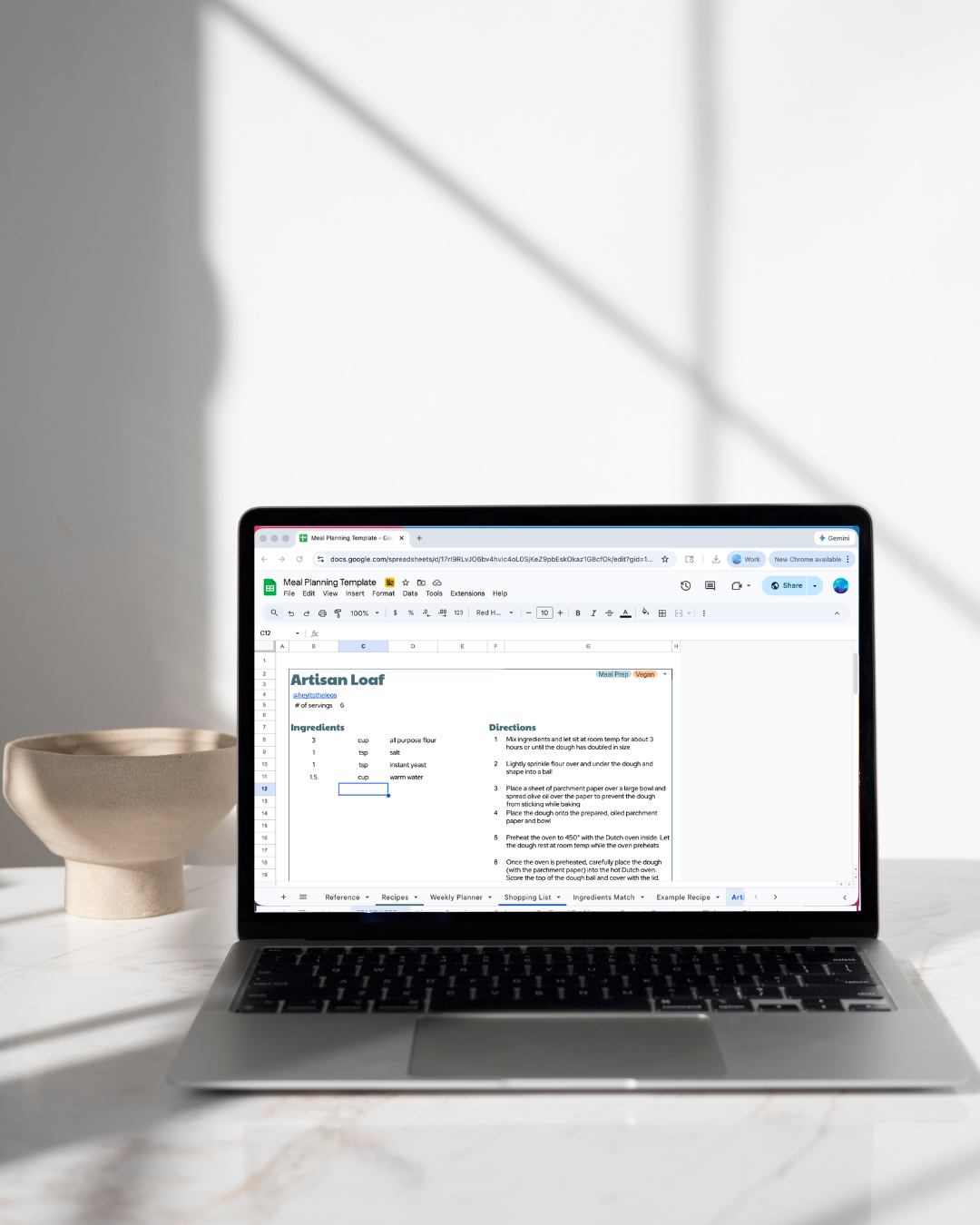
 Image 1 of 6
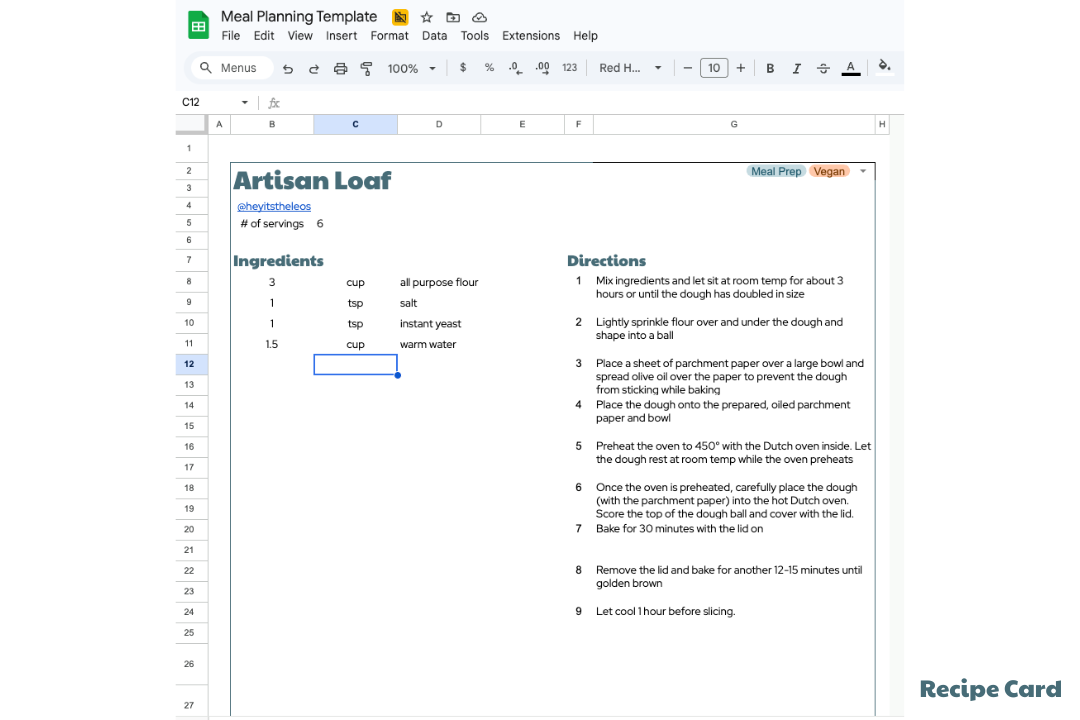 Image 2 of 6
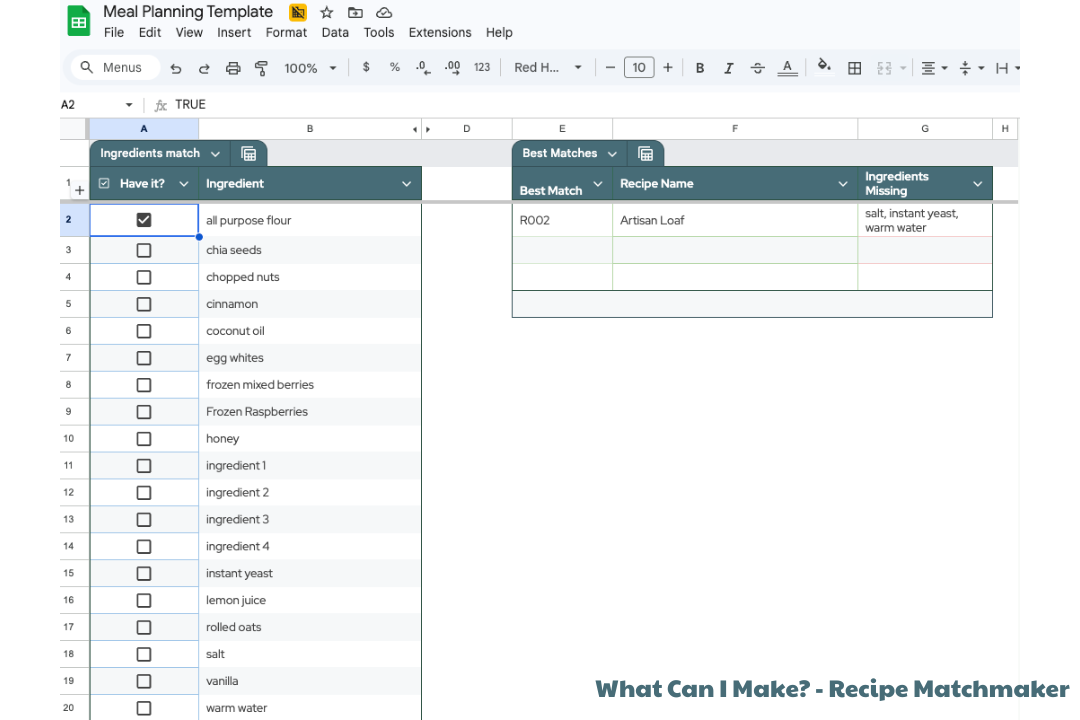 Image 3 of 6
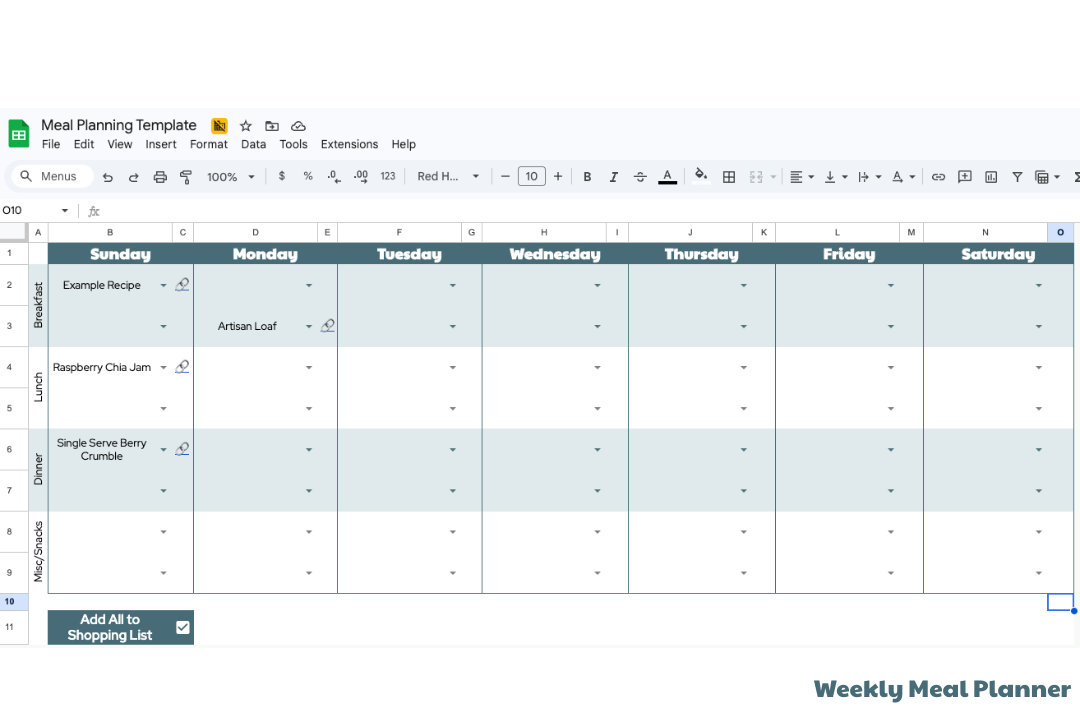 Image 4 of 6
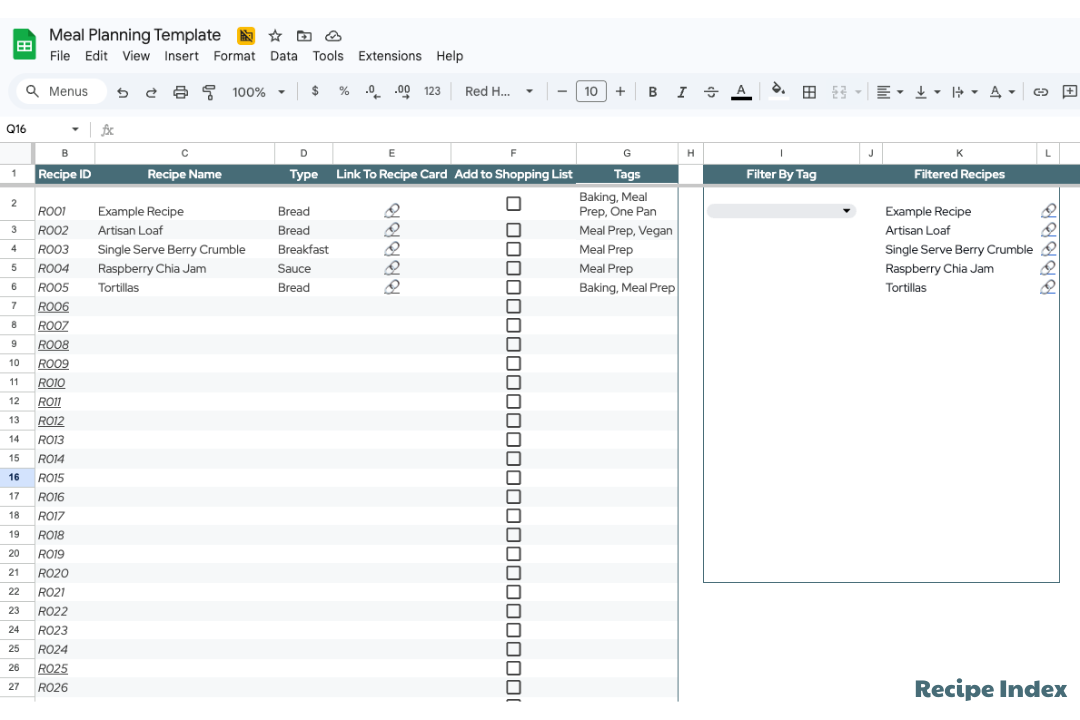 Image 5 of 6
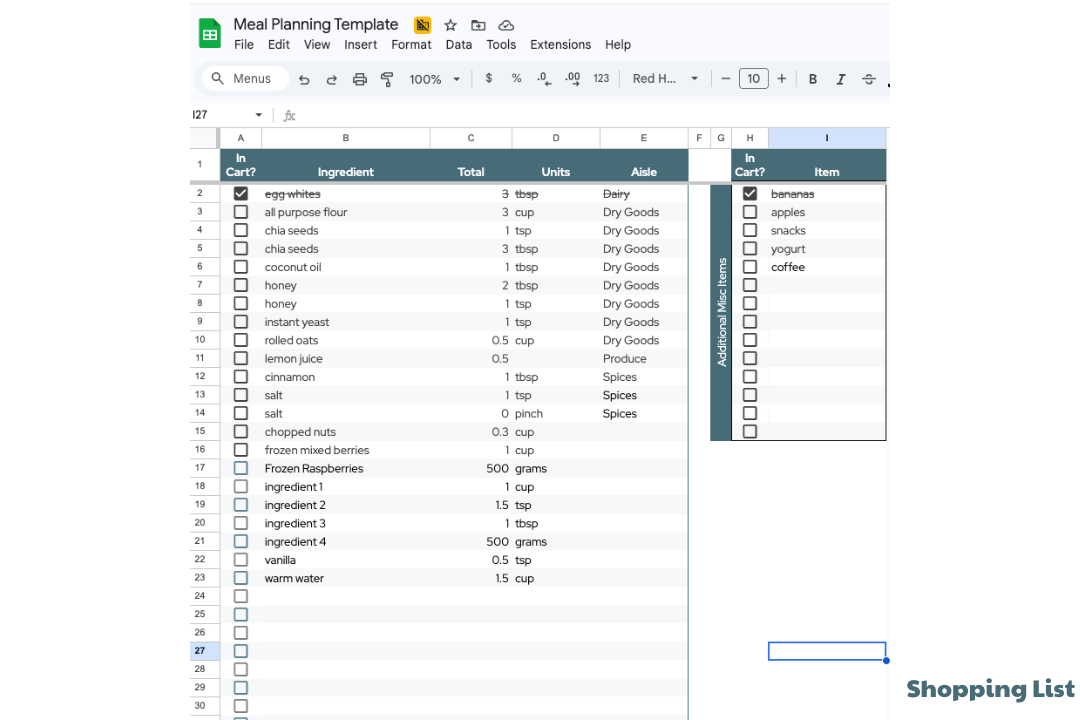 Image 6 of 6
Google Sheets Meal Planner with Shopping List (That Actually Does the Work For You)
If you've ever stared into the fridge at 6pm wondering what's for dinner — again — you already know the problem. Meal planning sounds like a great idea in theory, but between a busy schedule, rotating favorite meals, and the mental load of building a grocery shopping list from scratch every week, most people give up before the month is even over.
That's exactly why I built this Google Sheets meal planner with an automated shopping list — a smart, automated template that takes the chaos out of weekly meals and turns your kitchen routine into something you can actually stick to.
Why Google Sheets Is the Perfect Home for Your Meal Plan
Before we get into what the template does, it's worth talking about why Google Sheets is such an efficient way to manage meal planning in the first place.
Unlike a physical product or a printed calendar, a digital spreadsheet lives in your Google account, syncs across every device, and is accessible to your whole family in real time. No more texting someone a grocery list or losing a sticky note on the counter. It's also incredibly affordable — no subscription, no app to download, no learning curve if you've ever used Google Docs.
Google Sheets also lets you build logic into your planning. That means your meal plan spreadsheet isn't just a pretty calendar — it can think, auto-populate, and do the repetitive work so you don't have to.
What's Inside the Template
This isn't just a blank grid with days of the week. The Google Sheets meal plan template is a complete meal planning system built across multiple tabs, each designed to work together seamlessly.
Weekly Meal Planner
The planning tab uses a convenient weekly calendar layout so you can map out your weekly meals. Plug in your favorite recipes for each day, and the rest of the template responds automatically.
Automated Shopping List
Here's the part everyone loves: the automated shopping list.
Once you've filled in your weekly meals, the grocery shopping list tab auto-populates with every ingredient you need — pulled directly from your recipe database. No manual input, no copying and pasting, no forgetting the sour cream until you've already left the grocery store.
The list organizes items by category (produce, dairy, pantry, etc.) so your shopping trips are efficient and logical. You'll move through the grocery store once instead of doubling back three times. It also consolidates common ingredients across multiple recipes, so if two of your weekly meals use garlic and olive oil, you'll see a single combined quantity rather than two separate entries.
This is the easiest way to kill the "I already have that" problem and keep your grocery budget in check.
Personal Recipe Database
The template includes a built-in personal recipe database — your own digital recipe card collection. Add your own recipes with ingredients and serving sizes, and they become the source of truth the rest of the template pulls from.
This is the first step that makes everything else work. The more you build out your recipe collection, the smarter and more personalized your auto-populated grocery lists become. Over time it becomes a living record of your family's favorite meals, new recipes you've tried, and meals you want to rotate back in.
You can add a new recipe anytime, and it immediately becomes available to pull into your weekly meal plans. No re-entering ingredients, no hunting through old screenshots or browser bookmarks. It's all in one place.
Who This Template Is For
This weekly meal planner template was designed for real life — not idealized, Instagram-perfect meal prep. It works for:
Busy families who need to feed the whole family without reinventing the wheel every week
Individuals working toward a healthy lifestyle who want structure without rigidity
Budget-conscious households looking to cut down on grocery spending and food waste
Anyone who has tried — and abandoned — other meal planning spreadsheets because they were too complicated or required too much manual input
It's also great for people with specific dietary needs. Because you're building your own recipe database, everything in the planner reflects your food, not a generic template someone else designed.
How to Get Started
Getting started is simple, and you don't need to be a spreadsheet expert.
The first step is to make a copy of the template into your own Google account (File → Make a Copy). From there:
Head to the Recipe Database tab and start adding your favorite meals — even just 7 to 10 recipes is enough to get going
Open the Weekly Planner and assign meals to each day
Check the Shopping List tab — it will have already auto-populated your master grocery list for the upcoming week
Add any extra items you need (household supplies, snacks, etc.) in the manual section on the right
Take your list to the grocery store
The Best Part
You build it once, and it gets better over time.
Most meal planning tools require you to start from scratch every week. This Google Sheets meal planner compounds. Every new recipe you add, every weekly meal you log, every new item you incorporate becomes part of a system that learns your household's rhythm.
After a month of use, you'll have a fully stocked personal recipe database and a planning routine that takes minutes instead of hours.
It's a simple yet effective way to take back control of one of the most stressful, repetitive parts of running a household — and at just $10, it's the kind of purchase that pays for itself the first time you skip an unnecessary grocery run.
Get the Template — Just $10
Ready to make happy meal planning your new normal? Grab the Google Sheets meal planner with shopping list below and start your first week of stress-free, budget-friendly, automated grocery planning today.
A customizable Google Sheet with built in automations to make meal planning a breeze. Import your favorite recipe cards and watch it come to life. What’s Included:
In-Depth How-To Guide for using the Google Sheet
Example Recipe Cards to get started
Weekly Meal Planner
Automated Shopping List, organized by aisle/grocery store category
‘What Can I Make’ - Select the ingredients you already have on hand and see the top 3 matching recipes
One-time purchase. Instant delivery to your inbox. Works with any free Google account.
It can be accessed on a mobile device, but it is recommended to do all of the initial set up on desktop.